
MasterPlay Casino Login & Registration
At MasterPlay Casino, we want you to get from “I’m curious” to “I’m playing” in a few minutes without drama. You still get proper security, KYC checks and responsible gaming tools, just wrapped in a smooth sign-up and login flow that works on both desktop and mobile.
Introduction
Here is the thing: MasterPlay registration and login should feel easy, but also safe enough that you are comfortable depositing and playing for real money. At MasterPlay Casino, you create an account with a short sign-up form, confirm your contact details, and then you are ready to explore games or grab the welcome package.
Later, KYC steps and security checks help protect both you and us from fraud, but they are built around quick document uploads rather than long paperwork. Once your account is set, logging in is just email plus password, with reset options if you ever forget your details.
Creating an Account at MasterPlay Casino
If you are new around here, everything starts with the Sign Up button in the header. You pop open a small registration window at MasterPlay’s website, fill in basics like email and password, and you are already halfway to your first deposit.
The whole design keeps things short so you do not feel like you are filling out a tax form, while still collecting the info we need under our license and KYC policy. After that, you choose your currency and confirm your email, which is key for future password resets and security alerts.
Minimum player requirements
To open an account at MasterPlay Casino, you must be at least 18 years old, or older if your local law sets a higher minimum age for online gambling. You also have to be legally allowed to gamble in your country or region and accept our Terms & Conditions and Bonus Terms.
Each person can only have one account, which means no multiple accounts for the same individual, household, IP address or payment details. Creating extra accounts, providing fake data or trying to bypass country restrictions can lead to account closure and forfeiture of winnings under the terms.
Step-by-step registration via the Sign Up form
Let’s walk through the Sign Up flow like you will see it on the site:
- Hit the “Sign Up” button in the top bar on desktop or mobile.
- Enter your email, create a strong password and fill in the requested personal details (like name and date of birth) truthfully.
- Pick your country and preferred language, then accept the Terms & Conditions and policies.
- Submit the form, and your new MasterPlay account is created instantly.
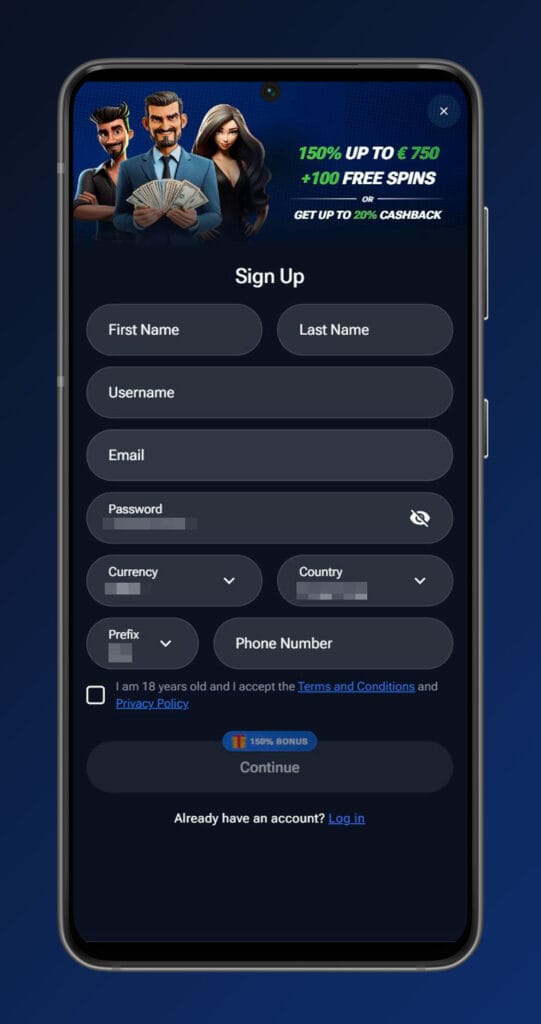
From there, you can go straight to the cashier to make your first deposit, decide whether to take the welcome package and start playing in a couple of clicks.
Choosing account currency and confirming contact email
During registration, you choose your main account currency, which can be the euro or another available option depending on your region. This currency will be the default for your deposits, withdrawals, balances and things like MasterPoints conversions, and changing it later usually requires support and can be restricted.
After signing up, you should confirm your contact email using the link sent to your inbox. This step is crucial for receiving security alerts, verification requests and for using the “forgot password” function later if you lose access to your MasterPlay login details.
Verification and Account Security
Now, let’s talk about KYC and security, because that is what keeps your account and money safe. MasterPlay Casino operates under a valid license and has to follow strict verification and anti‑fraud rules, which means at some point we will ask you to prove you are you.
The goal is not to slow you down but to prevent underage play, stolen card use and money laundering. Once you are fully verified, withdrawals and certain account actions generally run smoother and faster.
When MasterPlay requests KYC
KYC checks can kick in at different stages of your journey. Often they appear when you first request a withdrawal, reach certain deposit or payout thresholds, or if our risk systems flag unusual activity on your account.
We can also request documents if your personal details look incomplete or inconsistent, or if you change key information like address or payment methods. Until KYC is completed, some features like withdrawals or higher deposit limits may be restricted under the KYC Policy and general Terms.
Key documents to verify identity and address
To verify your identity, we will typically ask for a clear photo or scan of a government‑issued ID such as a passport, national ID card or driver’s license showing your full name, date of birth and photo.
For address verification, you may be asked for a recent utility bill, bank statement or similar official document that shows your name and residential address and is not older than a few months. In some cases, you might also need to verify your payment method with a masked card photo or an e‑wallet screenshot to prove ownership.
How security checks affect login, transactions, and possible restrictions
Security and KYC checks can temporarily affect what you can do with your account. When MasterPlay verification is pending, withdrawals can be paused, and in some cases, deposit and bet limits may be tightened until everything is confirmed.
MasterPlay logins will still work, but if there is suspicion of fraud, multi‑accounting or Terms violations, the account can be locked while the security team investigates. If the investigation confirms serious abuse, MasterPlay can permanently close the account, cancel promotions and confiscate associated winnings under the Bonus Terms and General Terms.
Logging In to Your MasterPlay Account
Once your account is created, actually getting back in is simple. You use the same email (or username if available) and password you set up during registration on both desktop and mobile.
Login is secured over SSL, and you should always check that you are on the official MasterPlay Casino site rather than a random link. From there, your balance, promotions, Cashback and MasterPoints are all tied to the same profile.
Signing in with email/username and password
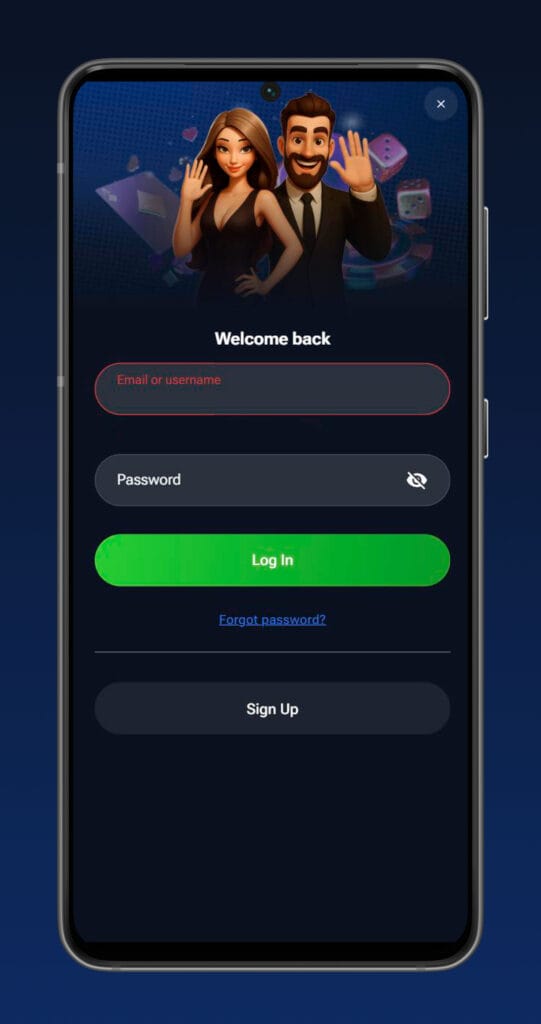
To log in, hit the “Log In” button on the site header, enter your registered email (or username if you set one) and your password, then confirm. If your credentials are correct and there are no active restrictions, you will land in the lobby with access to games, the cashier and promotions.
If you make too many wrong attempts in a row, the system may temporarily lock the login for security reasons. In that case, it is better to use the “forgot password” function or contact support rather than keep guessing.
Recovering access if you forget your password
If you forget your password, do not panic; it happens. Just click on the “Forgot password” link on the login form and enter your registered email address.
You will receive a reset link or instructions by email, letting you create a new password and regain access to your account. For this to work smoothly, your email needs to be valid and confirmed, and you must not have blocked MasterPlay communications in your mail settings.
Safe logout recommendations after each session
For safety, especially if you are playing on a shared or public device, you should always log out when you are done. Hit the profile or account icon and choose “Log Out” before closing your browser tab.
Avoid letting browsers auto‑save passwords on computers or phones that other people use. This reduces the risk of someone accessing your account, placing bets or trying to withdraw funds without your permission.
Logging In on Desktop and Mobile
You can log into MasterPlay Casino on pretty much any modern browser. The experience is very similar on desktop and mobile, with the same categories, promos and cashier, just reorganised for smaller screens.
There is also an option to “Install App” from the footer or header, which adds a web app shortcut on your phone so you can jump back to the lobby like a native app. It is still browser‑based under the hood, so you do not have to visit an app store.
Using the desktop website in a browser
On desktop, just open your preferred browser, type in the official MasterPlay Casino URL, and click “Log In” at the top. The site is built as a full web app, so after logging in to MasterPlay, you get access to slots, live tables, crash games, scratch cards, Virtual Sports and other categories right in the browser.
The layout keeps navigation, cashier and profile options in fixed positions so you can move between games, deposits and settings without losing your place. As always, check the address bar to make sure you are on the real site with an SSL lock visible.
Mobile login via browser and installing the web app
On mobile, you log in almost the same way, just through your mobile browser like Chrome or Safari. Tap “Log In” at the top, enter your email and password, and you are in, with games and menus adjusted for touch controls and vertical scrolling.
You can also install the MasterPlay “web app” using the “Install App” option, which places an icon on your home screen and opens the casino in a full‑screen shell. This does not change how login works, but it makes getting back into your account faster and keeps the experience closer to a native app.
Using VPN/proxy and risk of account restrictions under Terms & Conditions
Using VPNs or proxies might seem convenient, but it is risky from a Terms & Conditions perspective. Our license and security systems rely on your real region and IP for compliance, responsible gaming and fraud checks.
If we detect you are logging in from a blocked country, hiding your location, abusing multiple IPs or otherwise violating geo‑rules via VPN or proxy, your account can be restricted or closed. That can also impact withdrawals and any active promotions, so it is much safer to connect from your genuine location without masking tools.
Managing Your Account
Once you are logged in, your profile area is where you personalise and control your experience. From there, you can update some details, manage communication preferences and access responsible gaming tools.
Certain sensitive fields, like your full name and date of birth, are locked after verification to prevent misuse. For bigger changes (like currency or country) you will usually need to contact support with documents that justify the update.
Updating personal and contact details in your profile
Inside your account section, you can update things like your phone number, email preferences, and sometimes address details if they change. Any big changes to identity‑related fields may require fresh KYC documents to keep your profile consistent and compliant.
If you entered something wrong at MasterPlay registration (like a typo in your name), you should reach out to support quickly before KYC starts. Providing accurate, up‑to‑date info helps prevent delays when you later request withdrawals or use certain payment methods.
Limits, self-exclusion, and closing your account on request
MasterPlay Casino includes responsible gaming tools that let you control how you interact with your account. You can set deposit limits, time limits or cooling‑off periods via the Responsible Gaming section or by contacting support.
If you feel you need a longer‑term break, you can request self‑exclusion or even closure of your account, which support can apply according to the Responsible Gaming and Terms policies. Once self‑excluded, you will not be able to log in or deposit for the chosen period, and re‑opening the account requires checks and confirmation.

FAQ
No, each player is allowed only a single account at MasterPlay Casino, regardless of how many emails, devices or payment methods you have. Multiple accounts per person, household, IP address or payment details are treated as a violation of the Terms & Conditions and can lead to closure of all related accounts and confiscation of winnings.
Document requests are part of our KYC and anti‑fraud obligations under the license, especially before larger withdrawals or if our systems detect unusual activity. Once your ID, address and payment method are verified, withdrawals and some other account actions generally get smoother and faster, and you will only be asked again if something major changes on your profile.
No, you should not create or use an account if online gambling is restricted or illegal in your country or region. Our Terms & Conditions allow us to close accounts, void winnings and block access if we detect play from prohibited jurisdictions or see attempts to bypass geo‑rules.
First, check your spam or promotions folders and make sure you entered the correct email address in the Sign Up form. If the message still does not show up, contact our support team via live chat or email so we can resend the link or help correct your contact details.
Yes, some contact details, like phone and email, can be updated in your profile or with the help of our support team, as long as you pass any necessary security checks. If you change sensitive data, you may be asked for additional KYC documents so we can keep your account secure and consistent with our policies.
If you enter the wrong password several times, or our systems detect suspicious behaviour like unusual IP changes, your login can be temporarily locked for security. In those cases, it is best to use the “Forgot password” option or contact support instead of continuing to guess your details.
It is strongly recommended to log out after each session, even on your own laptop or phone, especially if other people might access it. Staying logged in increases the risk that someone else could place bets, change settings or attempt withdrawals from your account without your consent.
In most cases, you can still log in and play while KYC is being reviewed, but withdrawals and some limits may be restricted until verification is complete. If the documents do not pass checks or show serious issues, further restrictions or account closure are possible under our KYC and security policies.